A real field, to scale
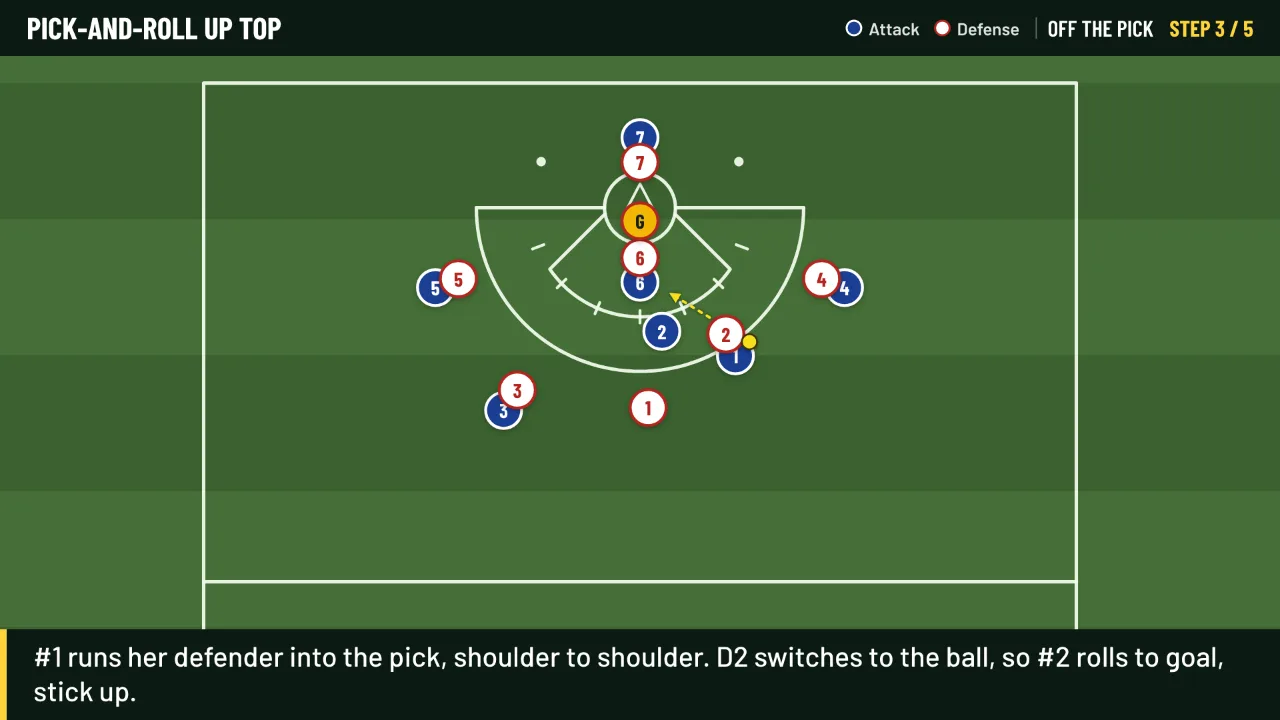
The 8 m arc and hash marks, the 12 m fan, the goal circle, restraining lines and the draw circle, all measured to NCAA lines.
Play board and team hub for coaches
Put a play on a field to scale, move players step by step with a caption for each, and send it to your team as a link or a video. Perfect for the plays they missed at practice.
Starting with women's lacrosse. More sports on the way.
Welcome back
Your team's playbook is waiting in the board.
Get started
Already have an account? Sign in with the same email and password on any device. Just want to look around? Try the board with no account.
Coach accounts aren't switched on for this site yet.
Open the boardWhat it does
The 8 m arc and hash marks, the 12 m fan, the goal circle, restraining lines and the draw circle, all measured to NCAA lines.
Step 1 is the setup. Add a step, drag players to where they go, and they run there in the animation, along curved or sharp-cut paths.
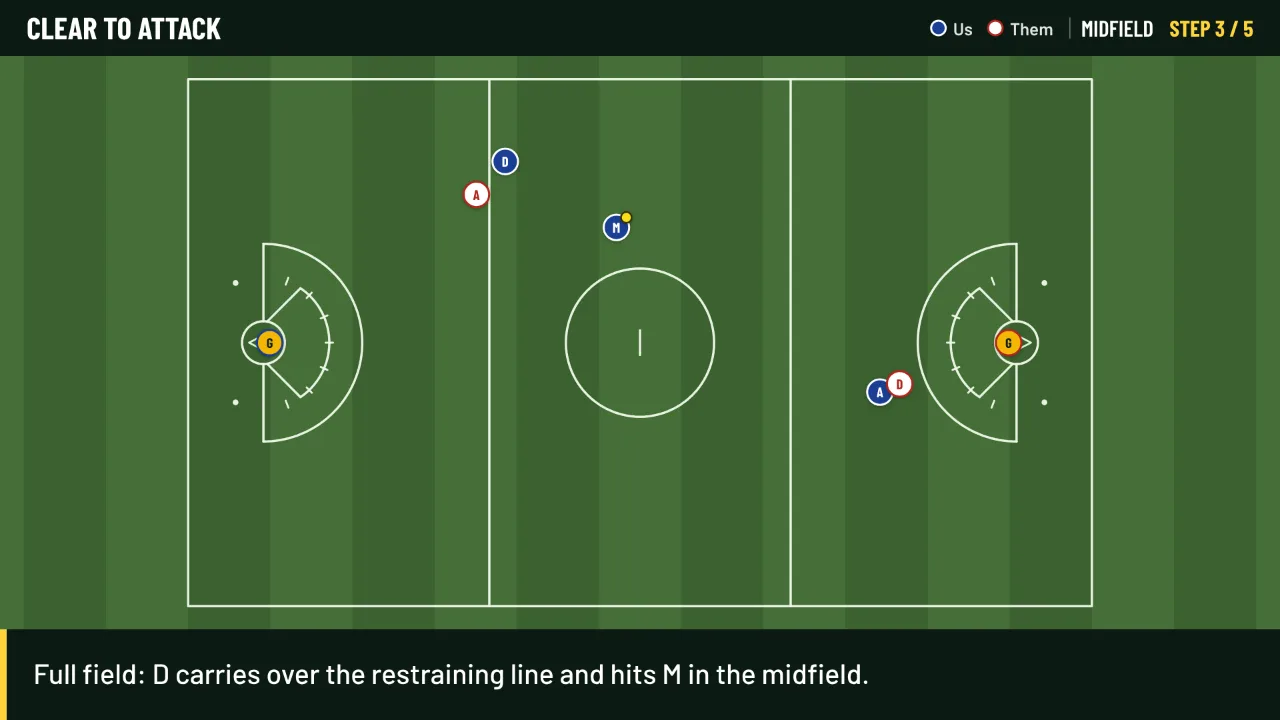
Show each step at the 8 m or on the full field. A clear goes 8 m → full field → 8 m at the far end, and the camera follows.
Write what players should see. The video pauses long enough to read it.
Every coach on the team opens the same plays, sorted into folders. If two coaches change the same play, nobody's work is lost.
Leave notes for your staff on any step, like what to watch for. Players never see them.
One link per play. It opens on any phone with play, step and speed buttons, and you can turn it off any time.
Save an MP4, a picture of one step, or a step sheet with every step on one page for a handout.
"Where do you go?": players drag their circle to the right spot. Add make-the-call rules questions too, with the why after they answer.
Drills, minutes and the plays you'll run, ready to print. Star plays of the week and they show first on your team link.
Full size, 110 × 60, or a small-sided youth field for 7 v 7, with the goal circle, 8 m and 12 m kept to scale.
After each save or goal against, the parent keeping stats taps where the shot went. See save % by spot on goal and by where shots came from.
Notes on how each opponent plays, the plays to run against them, and a one-page game-day sheet to print.
Share a play with every coach on Chalk Talk, or open a copy of theirs and make it yours. Names stay off.
Practices and games in one place, one-tap attendance, and a calendar file for every phone.
A coaches-only channel, a team channel with players and parents, pinned announcements, and email to the whole team from your own inbox.
Players 13 and up get their own page: assigned quizzes, a wall ball log, goals, skill ratings from you, and a recruiting profile they can share.
Pick-and-roll, crease slide, 8 m free position, defensive 3 seconds, the draw, clears. Open one and make it yours.
Why I made it
Every season it's the same: someone's out sick on the day we put in the new set, someone else learns better by seeing it than hearing it, and a whiteboard doesn't fit in the group chat.
I wanted one place to draw a play to scale, make it move step by step with a sentence on what to watch for, and send it to every player. So nobody falls behind because she missed a Tuesday, and so practice can start where we left off instead of re-explaining.
It's built for youth and middle school teams first, so players never need accounts, and it works just as well for older teams.
About me
#44 · Goalkeeper · Salisbury University, 2020–2024
I'm a goalie. I played five years at Salisbury University, started in goal for two, and was part of the team that won the national championship. A goalie sees the whole field and talks the defense through every slide, so explaining what's happening out there, clearly and fast, is what I've done my whole lacrosse life.
Now I coach, from club teams to Salisbury's goalies, and that's where Chalk Talk came from. By day I'm a network support engineer, and I built it myself, the same way I helped build Conquer Communication with my former teammate. If something's confusing or you want a feature, tell me: coaches shaped every part of this.
Safe for young players
Players never sign up. You send a link, they press play. That's it. Want quiz results kept? A parent adds her player with a first name only, and agrees for her.
Questions
No. The board, the team playbook and player links are free.
No. Open the board and draw. Plays save in your browser. Make a coach account when you want a team playbook and player links.
Never. They open the link you send. It works on any phone, tablet or computer.
On the board, open your team (top right), go to Coaches, and send them the join code. They make an account, choose Join a team, and type it in. You can change the code or remove a coach any time.
The second one to press Save gets asked first: open the newer version, save theirs as a new play, or replace it. Nobody's changes disappear without a choice.
Yes. Make video saves an MP4 you can text or post in the group chat. Pictures and step sheets work too.
The field uses NCAA measurements. The example captions are written to hold at most levels; edit them to match your league's rules.